
How to Turn One Blog Post Into a YouTube Script (Without Starting From Scratch)

You already did the hard part. The blog post is researched, outlined, and probably ranking for something useful. Now you want a second channel from the same work, and you do not want to spend another full day writing a script from scratch. The fastest path is a tight, repeatable workflow that lets you turn a blog post into a YouTube script without sounding like someone reading the article out loud. The exact steps below show how to take one post, give it a hook, pace it for the ear, and slice it into Shorts without re-recording.
Table of contents
- Key takeaways
- What actually changes when you move from skim readers to watch-and-listen viewers, and what stays the same
- How to pull a hook and a payoff from a blog post before you write a single line of script
- Mapping sections to scenes by turning each H2 into a visual, speakable beat
- Rewriting intros, examples and CTAs so the script sounds like a person, not the article read aloud
- Cutting the long version into Shorts and clips without re-recording anything
- Posting order: which to publish first, the blog or the video, and when each one earns the other traffic
- Frequently asked questions
- Sources
Key takeaways
- A script is not a transcript: the structure shifts from skimmable headings to speakable beats, but the research, examples and internal links stay.
- Pull the hook from the post's payoff, not its intro paragraph — viewers need a reason to keep watching in the first ten seconds.
- Each H2 becomes one visual scene, so the blog's outline becomes the video's spine and you write less from scratch.
- The long video and the Shorts come from the same recording session: cut by sentence, not by topic, and reuse the same b-roll plan.
- Publish the blog first, then the video, so the page already ranks when YouTube sends watch-time back to it.
What actually changes when you move from skim readers to watch-and-listen viewers, and what stays the same
When you repurpose a blog post into a video, the medium changes more than the message. Readers move their eyes down the page, choose what to skim, and bounce if the first two sentences do not earn the third. Viewers move their eyes across a frame, listen with one ear while doing something else, and bounce if the first ten seconds do not promise a payoff. That difference reshapes the script, not the underlying research.
What stays the same is the asset you already built. The original query, the supporting terms, the internal links the post points at, and the examples you chose are all still right. So is the meta description, which becomes the video description with almost no editing. The post's outline still gives you the spine of the video; you are not starting from a blank page, you are changing the surface.
What changes is the shape of each section. A blog H2 is a heading readers can jump to; a script beat is a scene a viewer has to be led into. Sentences get shorter. Paragraphs get cut. The tone drops one register toward spoken English, because the audience is listening, not reading. That single shift — written to spoken — is what separates a video that sounds like a person from a video that sounds like an article, and it is the rule the rest of this workflow enforces.
What should I keep from the blog post when I write the script?
Keep three things: the query the post was written for, the examples that already worked in text, and the internal links the post earned ranking with. The query tells you what the video has to promise. The examples are pre-tested content the audience already accepted. The internal links are the routing you do not want to redo — for instance, if your SaaS blog points product readers at a feature page, the video description and pinned comment should point at the same place. A practical resource on choosing what to write in the first place is a typical SaaS content page, which covers the brief side of this work.
How to pull a hook and a payoff from a blog post before you write a single line of script
The hook is the only line viewers cannot skip past. Write it before anything else, and write it from the post's conclusion, not its introduction. The conclusion is where the post says the thing the reader came for; that sentence is the payoff, and the hook is the question that leads to it.
A usable formula: take the conclusion sentence, rephrase it as a one-sentence promise, then open with the question the post spends the next 1,200 words answering. For a B2B SaaS post on internal linking, the conclusion might read "Sites that link product pages from contextually related posts earn more trials than sites that link from a generic footer." The hook becomes: "Want more trials from the posts you already rank for? Here is the one linking change that moves the number." The viewer now knows what the video is for and why they should keep watching.
Write the hook to camera in under fifteen words if you can. If the promise needs more than that, the post is probably about three things, and the video should be three videos. For Shorts especially, a long hook is a feature — Shorts viewers decide in two seconds, not ten, so the first sentence has to name the result. A reader who lands on the post via search has more patience than a scroller on the home feed.
Where is the best hook hiding in a finished blog post?
The conclusion is the strongest hook source because it already survived editing, already answers the query, and already uses the words readers search for. The introduction's second paragraph is the second-best source: it usually restates the promise in plain language. Skip the introduction's first paragraph entirely, because that is usually the throat-clearing the writer kept in for politeness.
Mapping sections to scenes by turning each H2 into a visual, speakable beat
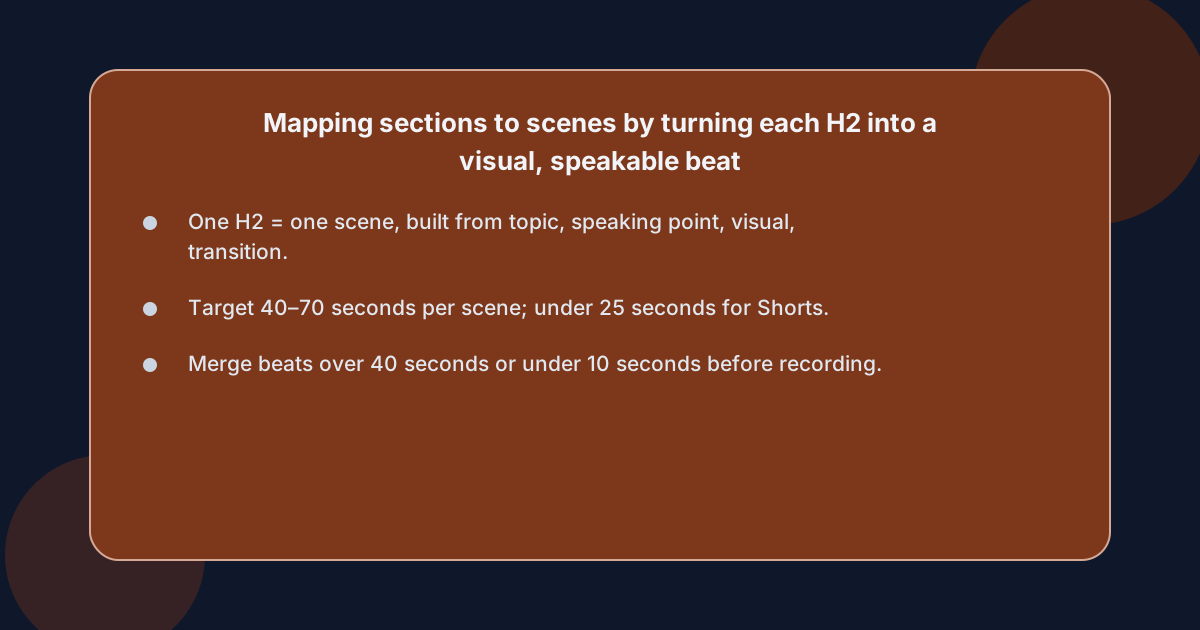 Treat each H2 in the post as one scene in the video. The H2 already gives you the topic; the paragraph below it gives you the speaking point. Your job in this step is to decide what the viewer sees while they hear each beat, not to rewrite the prose. A clean template for one beat:
- Topic: the H2, written as a one-line on-screen label so viewers who skim the captions know where they are.
- Speaking point: the single sentence from the post that carries the idea. Cut the other two.
- Visual: what the camera shows during that sentence — a screen recording, a slide, a talking-head close-up, or a cutaway to a real interface. For a B2B SaaS post, a screen recording of the actual product doing the thing the section describes is almost always the right visual, because it lets the viewer see the payoff they came for.
- Transition: the spoken sentence that hands the viewer to the next beat. Borrow it from the H2 below it.
A post with five H2s becomes a video with five scenes. A post with seven H2s becomes a seven-scene video, which is usually one scene too long; collapse two related beats into one before you start recording.
A useful sanity check before you record is to read the beats aloud in order. If a beat takes more than forty seconds to say, it is hiding two ideas. If a beat takes less than ten, it is not earning its own scene and should be folded into the next one. This is also the right moment to write a reusable beat-by-beat template you will apply to every post that comes out of the calendar.
How long should each scene be?
Target forty to seventy seconds per scene for a long-form video, and under twenty-five seconds per scene for a Short. Anything shorter loses the viewer to the next tab; anything longer loses them to a re-take in editing. Most blog H2s map cleanly to one scene at that length once you cut the supporting examples down to one.
Rewriting intros, examples and CTAs so the script sounds like a person, not the article read aloud
The fastest way to ruin a repurposed script is to read the article. The fastest way to fix that is a small set of substitutions you apply as you lift each sentence from the post. First, swap written connectives for spoken ones: "however" becomes "but", "furthermore" becomes "and", "in conclusion" becomes "so". Third, replace abstractions with the concrete noun: "improve conversion" becomes "get more signups", because viewers need to hear the thing, not the category.
Examples need the same treatment. A blog example is usually a sentence of context followed by a number; a spoken example is the number, then the context, because the ear tracks numbers first.
CTAs are where most repurposed scripts sound like articles. The blog CTA is a button label and a sentence. The video CTA is one short instruction the viewer can do in the next ten seconds, said in the last third of the script: "If you write B2B content, take the post you are most proud of and turn it into a video this week." A specific, small instruction lands; a generic one does not.
How do I rewrite blog intros so they do not sound like a transcript?
Take the post's introduction, keep the promise, and delete the framing. Most blog intros open with a one- or two-sentence framing that sets up the rest of the post — "In this guide we will cover...". That sentence has no job on camera. Keep the second and third sentences of the post's intro, which usually restate the question and the answer, and stitch them into a spoken opening that names the viewer.
Cutting the long version into Shorts and clips without re-recording anything
The Shorts come from the long video, not from a separate recording. Cut them from the strongest beats, not from the strongest topics, because beats are scenes you already shot. A beat that works in the long video at forty-five seconds can usually become a forty-five-second Short by trimming the lead-in and the transition, then re-cutting to a vertical frame.
A workable workflow per pass:
- Pick by sentence, not by topic. Find the one sentence in the long video that says the most useful thing in the fewest words, and open the Short on that sentence. Topic-led cuts tend to start with context the Short viewer does not need.
- Open on the result. Shorts viewers need the promise in the first two seconds. Lead with the payoff sentence, not the setup.
- Re-cut to vertical. Pull the same screen recording or talking head into a 9:16 frame; you are not re-shooting, you are reframing.
- Caption the first frame. Many Shorts viewers watch with the sound off for the first second; an on-screen sentence that names the result keeps them past that second.
- Pin a link to the long video. The Short sends viewers to the long video, which sends them to the post, which sends them to the product.
This is also the step where the cut points are easier to find when the long script was written beat by beat from the start.
Which beats make the best Shorts?
The beats that earn the most watch-time in the long video are the beats worth cutting into Shorts. You can read the retention graph on any video you have already published; the flat sections are usually the beats worth lifting, because the viewer was already staying for them.
Posting order: which to publish first, the blog or the video, and when each one earns the other traffic
Publish the blog first, let it index, then publish the video. The post gives you a ranked URL the video can point at; the video gives you watch-time and a thumbnail the post does not have. Neither earns the other traffic on day one, so the order matters.
A workable cadence:
- Day one. Publish the blog post. Submit the URL for indexing in Search Console. Wait for it to be crawled.
- Day three to seven. Publish the YouTube video. Put the blog URL in the video description, the pinned comment, and the end card. The post already has a meta description; reuse it as the first two lines of the video description.
- Day fourteen. Read both back against their respective consoles. If the video is earning watch time but not click-through, change the pinned comment to point at a more specific section of the post. If the blog is earning impressions but not clicks, change the post's first paragraph to reference the video.
The two pieces start cross-linking as soon as both exist. The video sends viewers to the post for the source links, the examples and the references. The post sends readers who landed from search to the video for the same content in another medium. Neither piece does the work alone; that is also why we treat the script as a derivation of the post rather than a separate artifact, and why it pays to keep the workflow that derives one obvious in the first place. Teams that already run a content calendar will recognize this as the same brief-discipline the SEO content for SaaS page describes, applied to a second format.
For readers who want to stop hand-rewriting every script from scratch and start running the workflow above on a calendar, sign up for a three-day trial that builds the plan and publishes the posts; the video workflow above is the next step a team runs on its own once the calendar is delivering posts.
Frequently asked questions
How long should a repurposed YouTube script be?
A repurposed script should be roughly the word count of the source blog post, divided by three, then spoken at a normal pace. A 1,500-word post becomes a 500-word script, which is about three and a half minutes of video. Anything shorter loses the depth the post earned; anything longer adds scenes the post did not justify.
Should I script every word of the video or use a loose outline?
Use a tight outline for scenes and a tight script for the hook, the transitions and any sentences carrying numbers. Talk loosely through the middle of each beat and tighten the spoken version in the edit. Viewers forgive a rough middle if the open and close are clean; they forgive a rough open far less easily.
Do I need different footage for Shorts and the long video?
No. Cut the Shorts from the same recording session, reframed to vertical. Plan one b-roll shot per beat before you begin, and you have everything you need for both cuts without re-recording.
Can I publish the blog post and the video on the same day?
You can, but you should not. The blog needs a few days to be crawled and indexed before the video points at it; otherwise the video sends traffic to a URL that has not been ranked yet, and you lose the cross-link benefit.